
 Bahader Database Cleanup
A lighter, faster WooCommerce database.
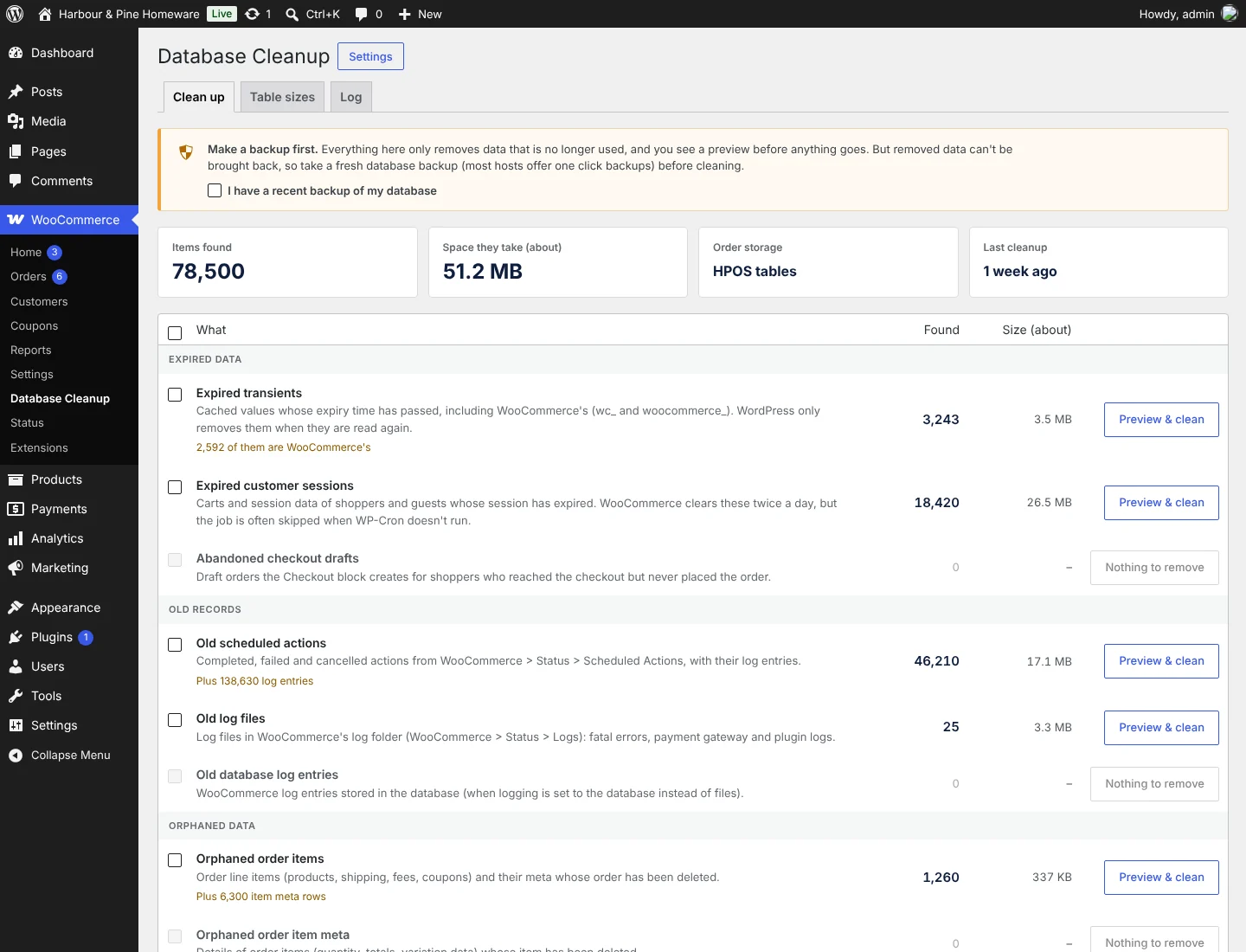
Every order, visit and background task leaves rows behind. Bahader Database Cleanup shows you what WooCommerce has piled up, how much space it takes, and removes it safely in small batches.
- HPOS aware
- Preview before you clean
- Runs in safe batches
How it works
-
1
Scan
See every kind of WooCommerce clutter with a count and the space it takes.
-
2
Preview
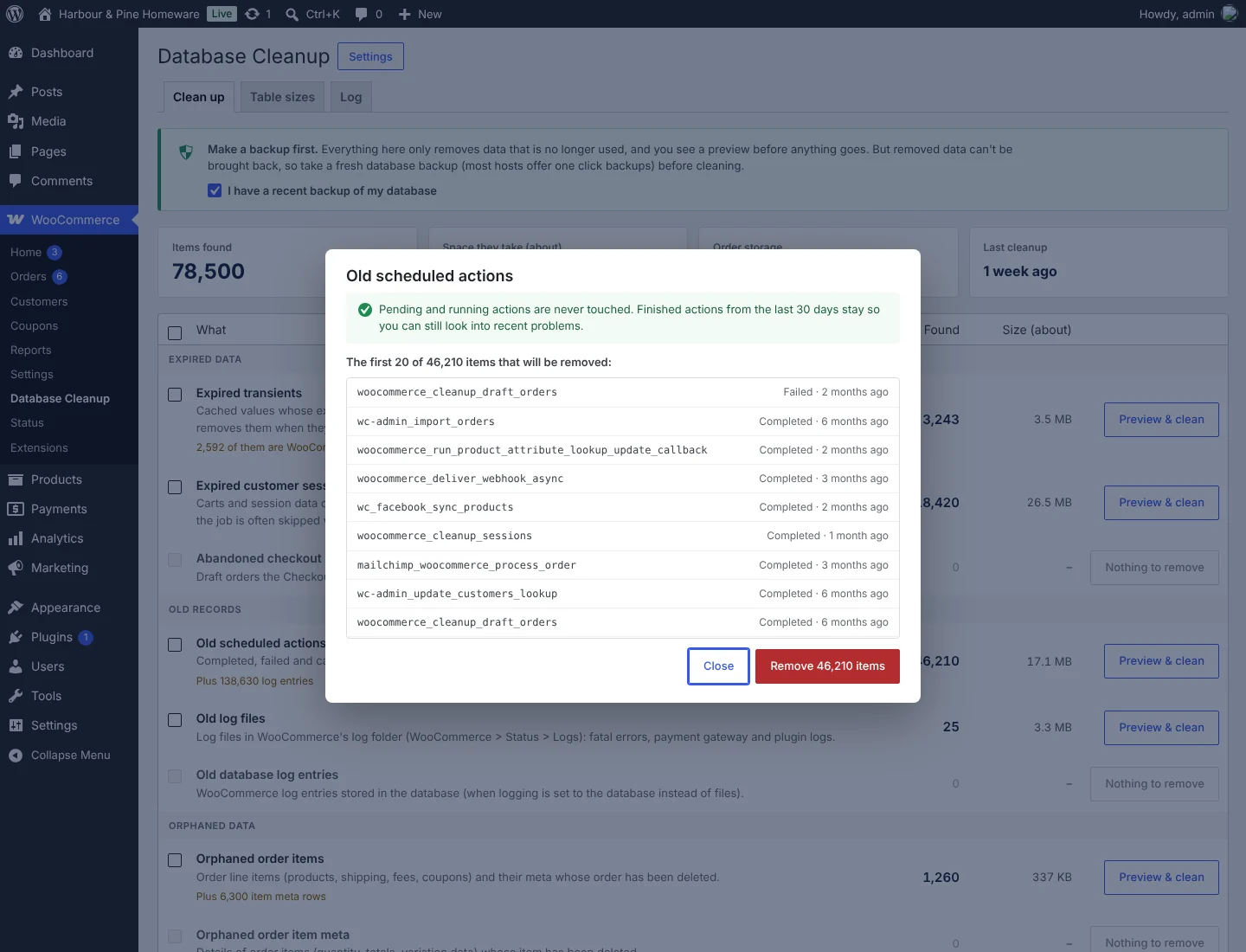
Look at exactly what will be removed before anything is deleted.
-
3
Clean
Remove it in small batches, so even large stores never time out.
A full cleanup, free
The free plugin finds and removes WooCommerce clutter by hand, with no limits or trials.
Scan with counts and sizes
Every kind of WooCommerce clutter, how many rows or files there are and roughly how much space they take.
Expired sessions and transients
Carts and cached values whose expiry time has passed. Live carts and anything still valid stay.
Old scheduled actions and logs
Finished, failed and cancelled actions older than the days you choose, with their log entries. Pending and running actions are never touched.
Orphaned order data
Order items, item details and HPOS order data whose order no longer exists, plus orphaned post and comment details.
Old trash and log files
Orders and products that have been in the trash longer than you choose, old log files and database log entries.
Preview before you clean
See exactly what will be removed and what stays, before anything is deleted.
Safe batches, no timeouts
Cleaning runs in batches of 500 rows with a progress bar, so large stores on cheap hosting finish too.
Table sizes and a log
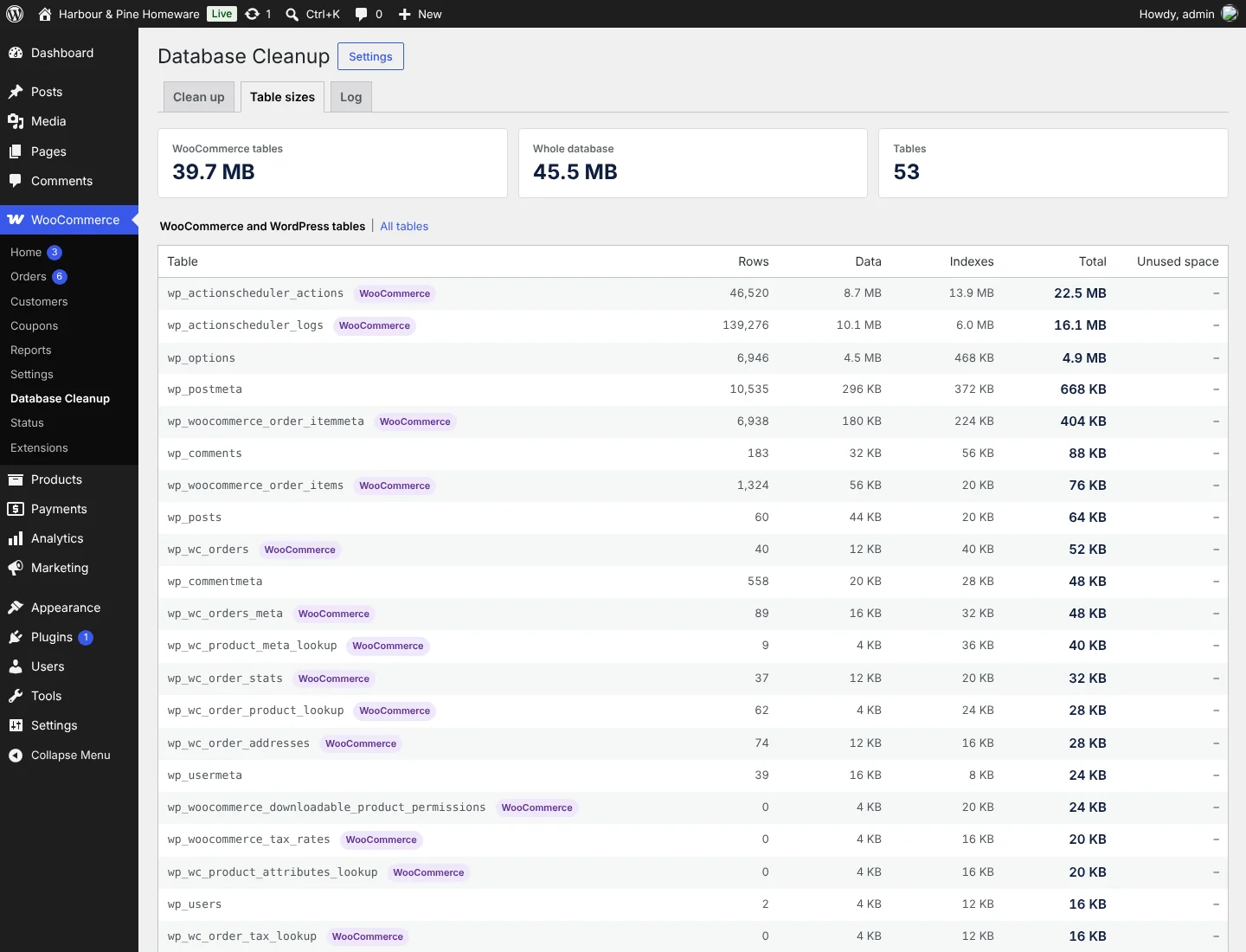
The size of every WooCommerce table, and a record of every cleanup with what was removed.
Pro: keep it clean on its own
Pro installs next to the free plugin. It runs cleanups on a schedule, clears up after the move to HPOS, optimises tables and shows you how much space was freed.
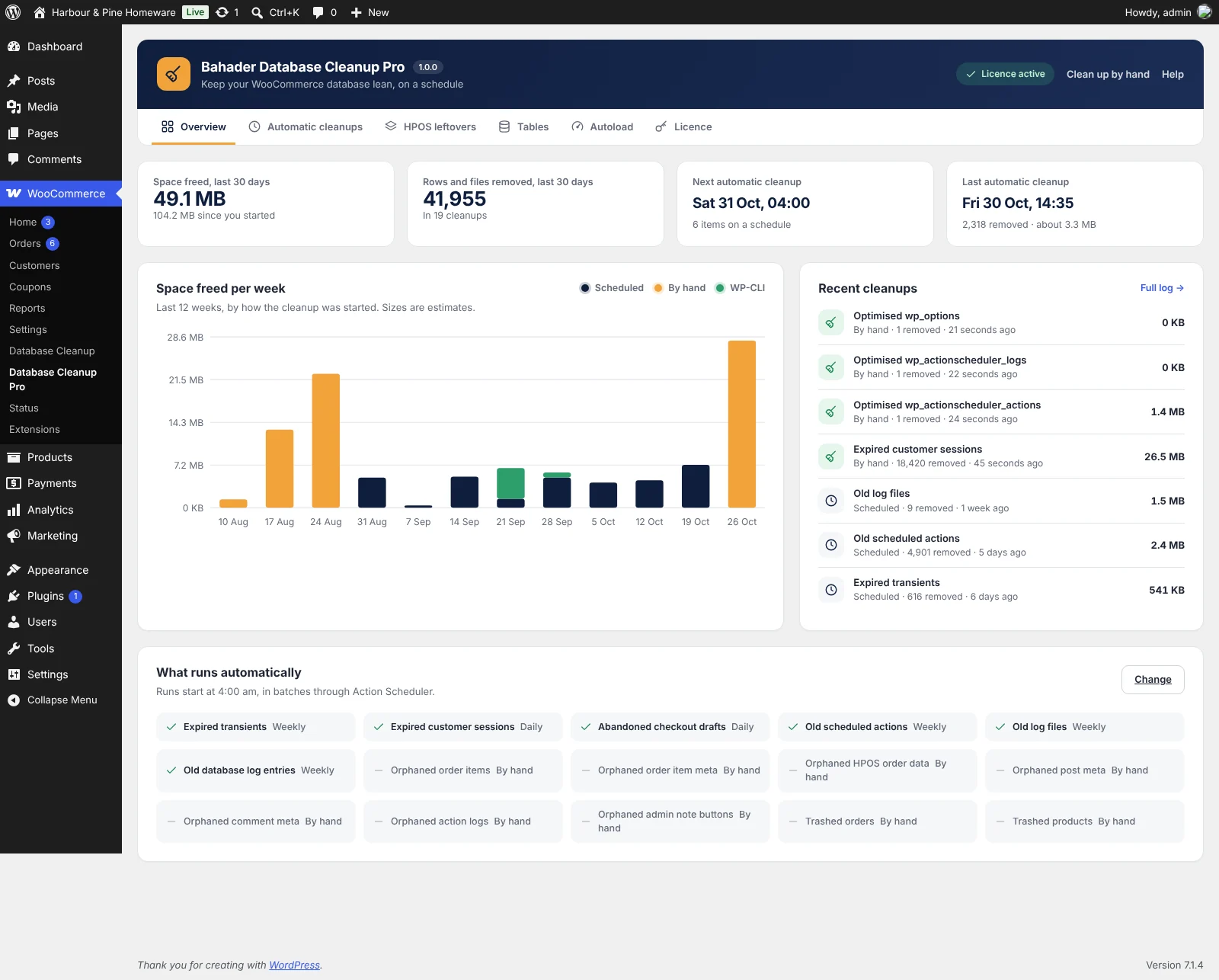
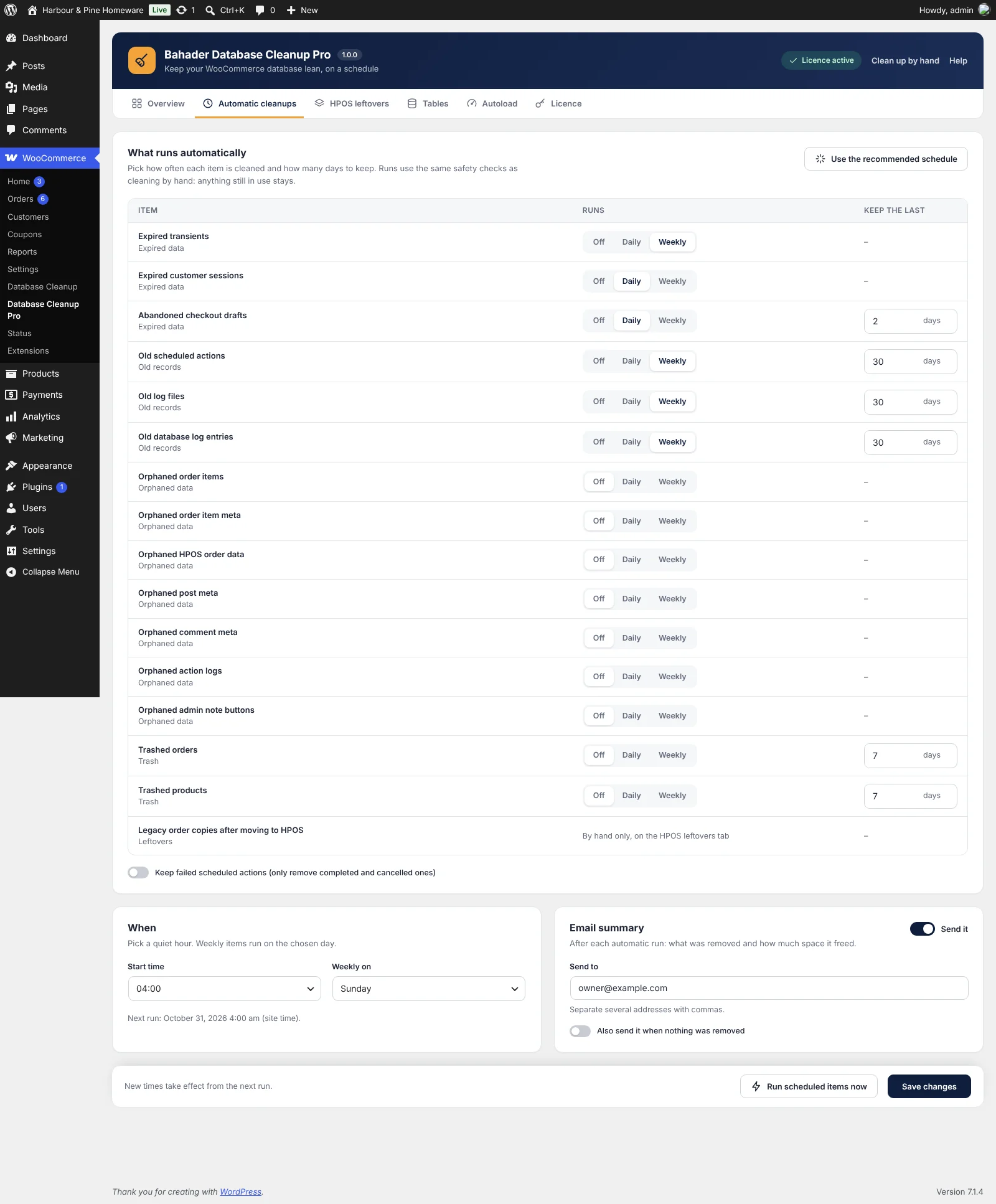
- Automatic cleanupsOff, daily or weekly for each item, at the hour and weekday you choose, in short batches through Action Scheduler.
- Retention per itemKeep 30 days of scheduled actions, 14 days of logs, 7 days of trash, or whatever suits you, item by item.
- Email summaryAfter each automatic run, an email lists what was removed and roughly how much space it freed.
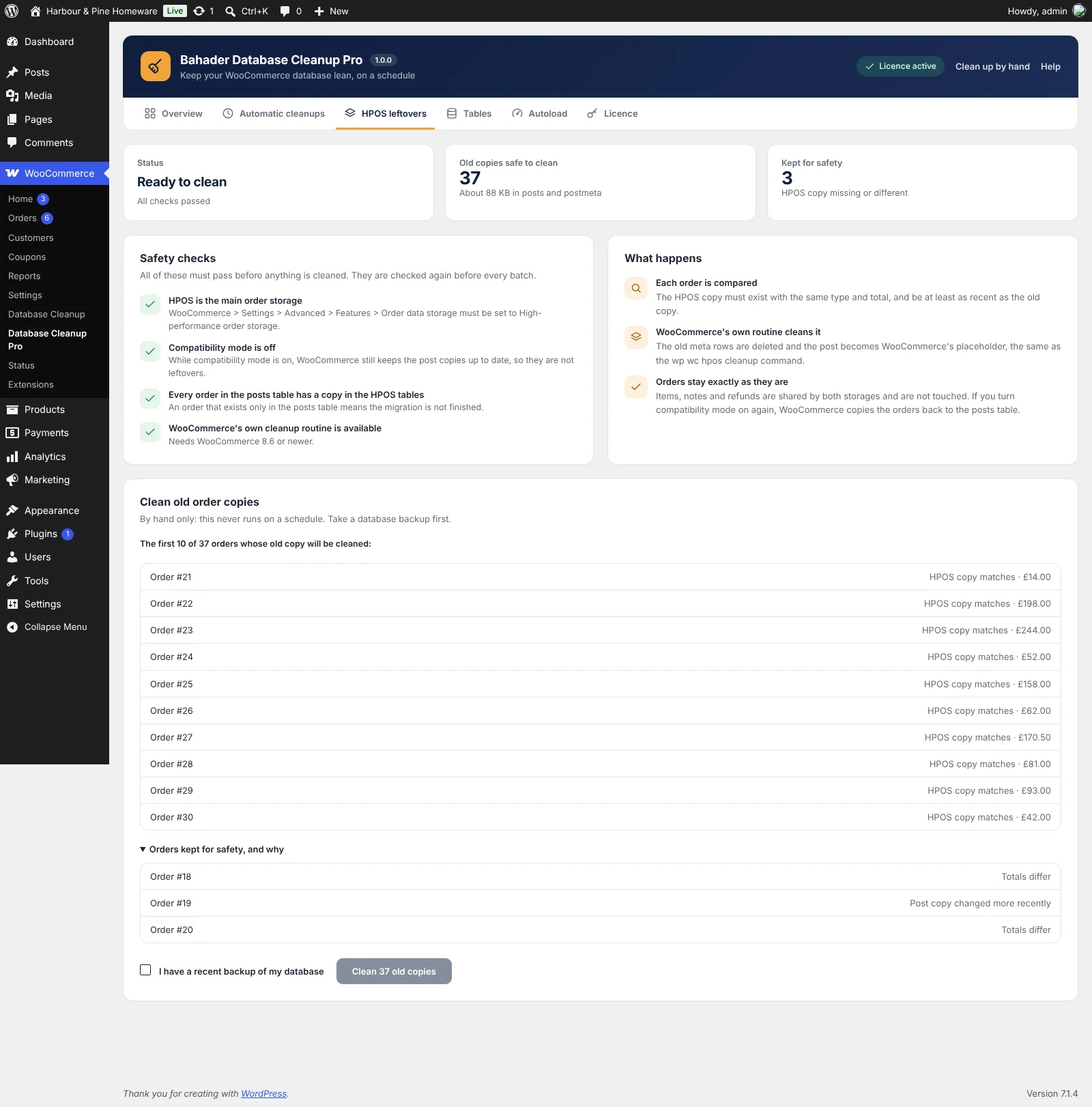
- HPOS leftoversAfter moving to HPOS, removes the old order copies in the posts tables, only once each order's HPOS copy is checked.
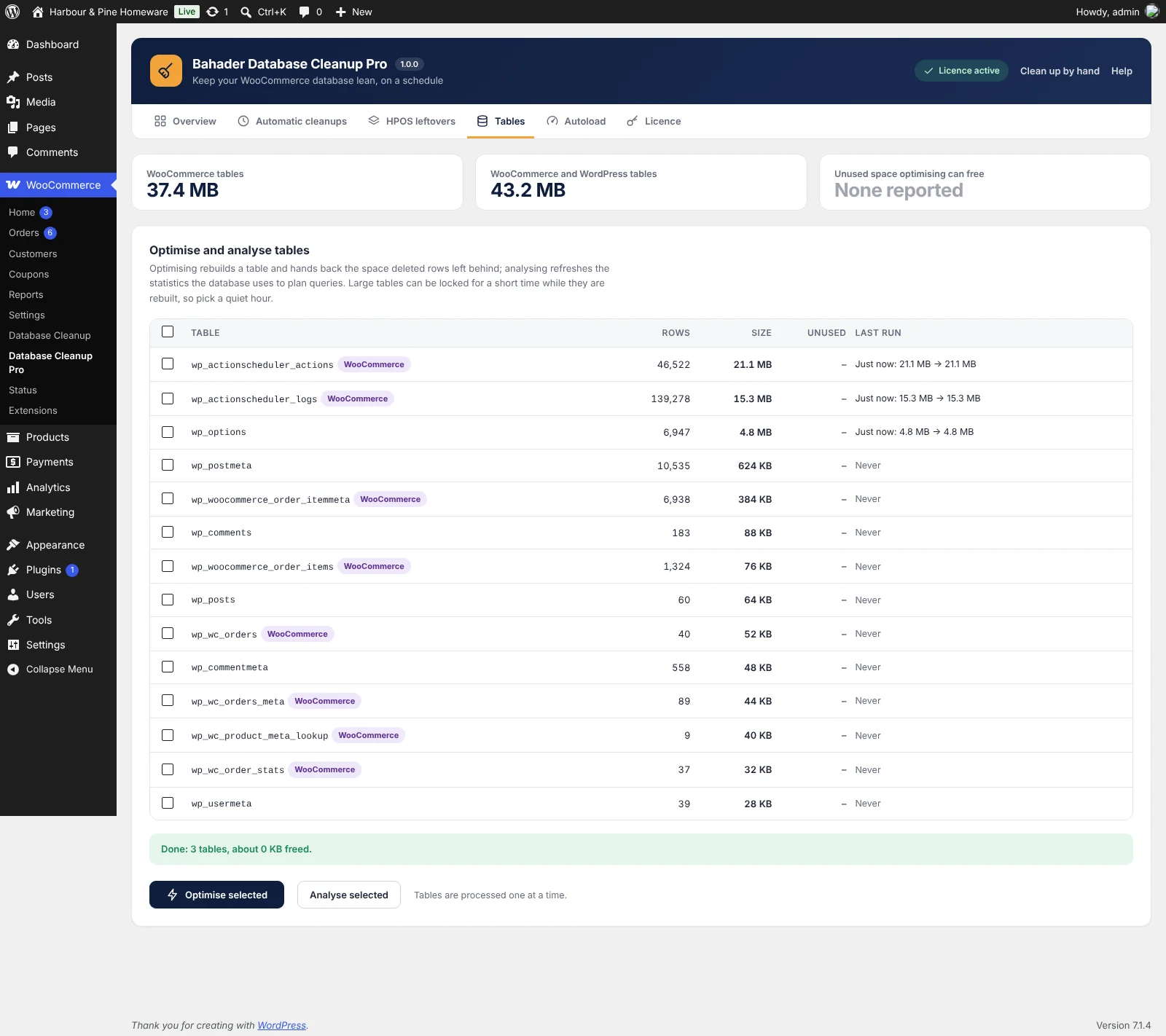
- Table optimisationOptimise or analyse tables one at a time, with the size before and after.
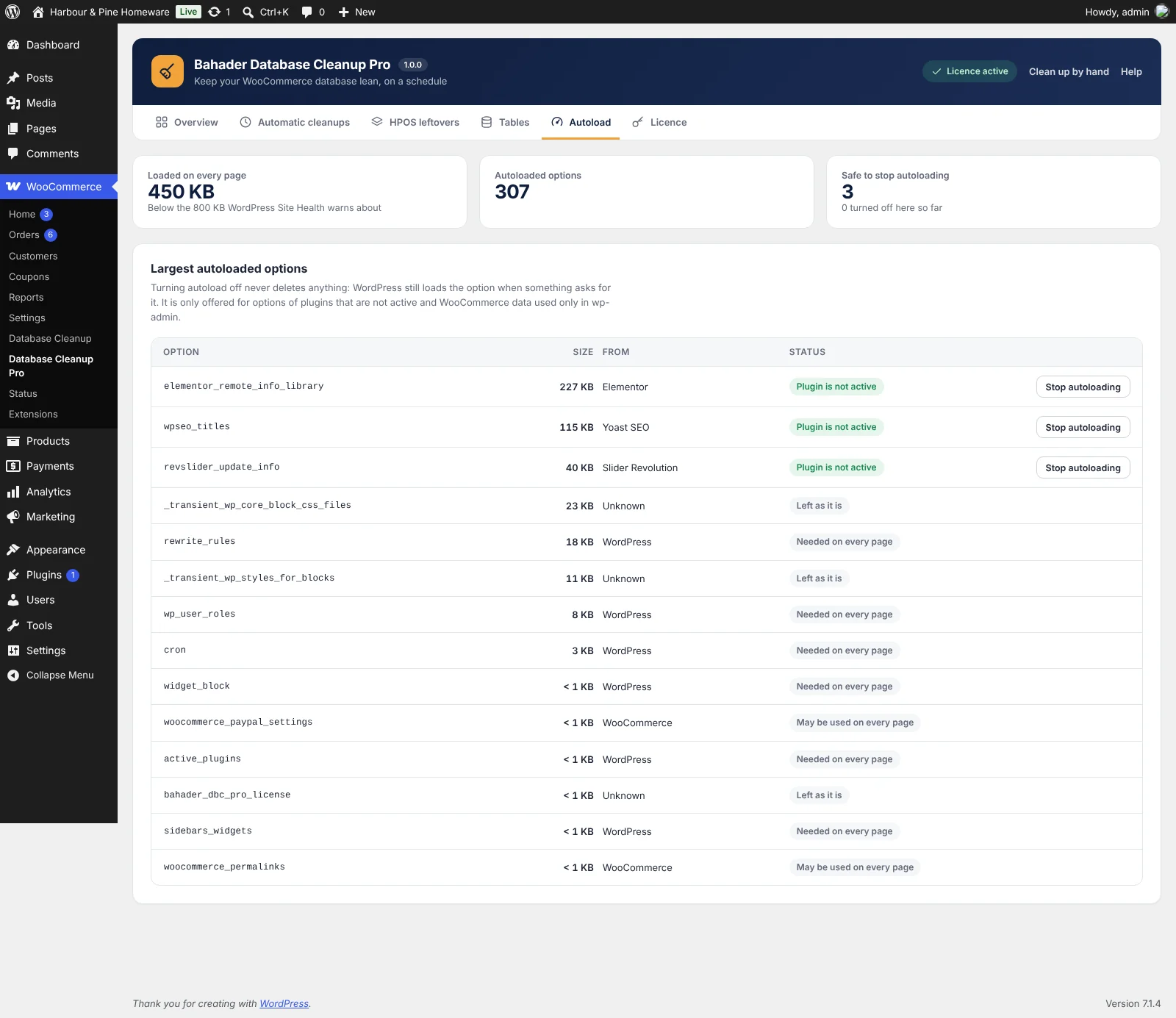
- Autoload auditSee the largest options loaded on every page and stop autoloading the ones known to be safe. Nothing is deleted, and it can be undone.
- History and chartSpace freed per week over the last 12 weeks, recent cleanups and what runs automatically.
- WP-CLIwp bahader-dbc scan and wp bahader-dbc clean, with --dry-run, for hosts and agencies.
Inside Pro
Pro adds its own page in WooCommerce, with what matters at a glance and every setting a click away.
Free and Pro side by side
| Feature | Free | Pro |
|---|---|---|
| Scan with counts and sizes | Included | Included |
| Expired sessions, transients and checkout drafts | Included | Included |
| Old scheduled actions, logs and log files | Included | Included |
| Orphaned order, post and comment data | Included | Included |
| Old trashed orders and products | Included | Included |
| Preview, batches and a cleanup log | Included | Included |
| Automatic cleanups on a schedule | Not included | Included |
| Retention per item and email summary | Not included | Included |
| HPOS leftovers cleanup | Not included | Included |
| Table optimisation and autoload audit | Not included | Included |
| Overview chart and WP-CLI | Not included | Included |
| Updates and email support | Forum | 1 year, by email |
Database Cleanup Pro, billed yearly
Every plan includes all Pro features, a year of updates and email support, and a 14-day money-back guarantee.
Single site
1 site
$49 / year
- All Pro features
- Updates for a year
- Email support
- Use on 1 site
Five sites
5 sites
$99 / year
- All Pro features
- Updates for a year
- Email support
- Use on 5 sites
Agency
25 sites
$199 / year
- All Pro features
- Updates for a year
- Email support
- Use on 25 sites
Prices in US dollars. Sales tax or VAT is added at checkout where it applies. Orders are processed by our online reseller Paddle.com, who is the Merchant of Record for all our orders. See the Terms and Refund policy.
Setting it up
-
1
Back up your database
Most hosts offer a one-click backup. Removed data can't be brought back, so take one before your first cleanup.
-
2
Install the free plugin
In WordPress, go to Plugins › Add New, search for "Bahader Database Cleanup", then install and activate it. WooCommerce must be active.
-
3
Scan and clean
Open WooCommerce › Database Cleanup. Tick that you have a backup, preview an item, then clean it. Start with expired sessions and old scheduled actions.
-
4
Add Pro and schedule it
Upload the Pro zip under Plugins › Add New › Upload Plugin, enter your key under WooCommerce › Database Cleanup Pro › Licence, then click "Use the recommended schedule" under Automatic cleanups.
Questions
Is the free version really free?
Yes. Scanning and cleaning work fully, with no limits or trials. Pro is a separate add-on for stores that want cleanups to run on their own.
How do I get my licence key?
Choose a plan and pay through our reseller Paddle. Your licence key and download link arrive by email from support@bahaderlabs.com within a few minutes. Install Pro next to the free plugin and enter the key under WooCommerce › Database Cleanup Pro › Licence.
Can it delete my orders or products?
Only orders and products that are in the trash, and only once they have been there longer than the number of days you choose. Everything outside the trash is never touched.
Will customers lose their carts?
No. Only sessions whose expiry time has already passed are removed. Live carts stay.
Is the HPOS leftovers cleanup safe?
It only runs when HPOS is the main order storage, compatibility mode is off and every order in the posts table has an HPOS copy. Each order is checked again right before it is cleaned, the cleaning is done by WooCommerce's own routine, and it never runs on a schedule.
Do I need a backup?
Yes. Everything is checked before it is removed, but removed data can't be brought back. Both the free plugin and Pro ask you to confirm a recent backup before cleaning by hand.
Does it work on large stores and cheap hosting?
Yes. Every cleanup runs in batches of 500 rows by default, and scheduled runs stop after 20 seconds and carry on in the next request.
What happens when my licence ends?
Pro keeps working on your store. You only stop getting new versions and email support until you renew.
Does the plugin send my store data anywhere?
The free plugin never contacts any outside server. Pro checks your licence key and looks for updates on our server, sending only your site address, the plugin version and the key.
Can I get a refund?
Yes. If Pro isn't right for you, ask within 14 days of buying or renewing and you get your money back in full.